- Initialization Is a Contract
- The State Machine
- Bootstrap vs Configure: What Belongs in Each Layer
- What Is Available in Each State
- The Configuring State Is Transient
- Reconfiguration
- Idempotent Initialization
- Thread Contract
- Android Thread Annotations
- Swift Concurrency and Actor Isolation
- Memory Ownership
- Android Lifecycle Boundaries
- iOS Lifecycle and App Extension Constraints
- An SDK Lifecycle Checklist
WritingArchitecture
Initialization, State, and Thread Safety in Mobile SDKs
SDK initialization is not just 'call this method first.' It is a state machine, a thread contract, and a lifecycle boundary. Here is how to design it as one.
14 min readSeries 3 of 7
- 01Designing a Mobile SDK That Developers Actually Want to Use
- 02The Public API Surface Is the Product
- 03Initialization, State, and Thread Safety in Mobile SDKs
- 04Developers Do Not Mind Errors. They Mind Unclear Errors.
- 05Shipping the SDK Is Where Trust Starts
- 06Secure Defaults for Mobile SDKs
- 07Same Concepts, Native Experience
This article addresses two failure modes that appear together in almost every SDK that generates integration complaints in production.
Initialization Ambiguity is what happens when the SDK does not define when it is ready, what is required, what can be deferred, and what happens when methods are called out of order. It shows up as cryptic errors, unexpected behavior in edge cases, and developers being told to "make sure you initialize first" without a clear contract for what that means.
Thread Contract Omission is what happens when the SDK does not say which APIs are safe from any thread, what thread callbacks arrive on, and how shared SDK state is protected. It shows up as intermittent crashes in production that are difficult to reproduce and even harder to attribute to the SDK.
Both failure modes share a root cause: initialization and threading were treated as implementation details rather than as part of the SDK's public API contract.
Initialization Is a Contract
SDK initialization is not "call this method first." It is a statement about what state the SDK is in, what APIs are available in each state, what transitions are possible, and what threading guarantees apply at each stage.
An SDK that does not make this explicit leaves every answer to the developer's intuition. Intuition is a poor substitute for a documented contract.
Article 1 in this series covers the two-layer bootstrap/configure pattern and why sensible defaults matter. Article 2 covers the public API shape that sits on top. This article focuses on the state transitions, threading guarantees, and lifecycle boundaries that make initialization safe under production conditions.
The State Machine
A mobile SDK lifecycle can be modeled as six states:
plaintext
NotInitialized    SDK exists, bootstrap() has not been called
Bootstrapped      bootstrap() succeeded, core APIs are available
Configuring       first configure() is in progress (transient, async)
Configured        configure() succeeded, all APIs are available
Reconfiguring     configure() called again from Configured (transient, async)
BootstrapFailed   bootstrap() failed (terminal, SDK is unusable)
The state machine:
State machine
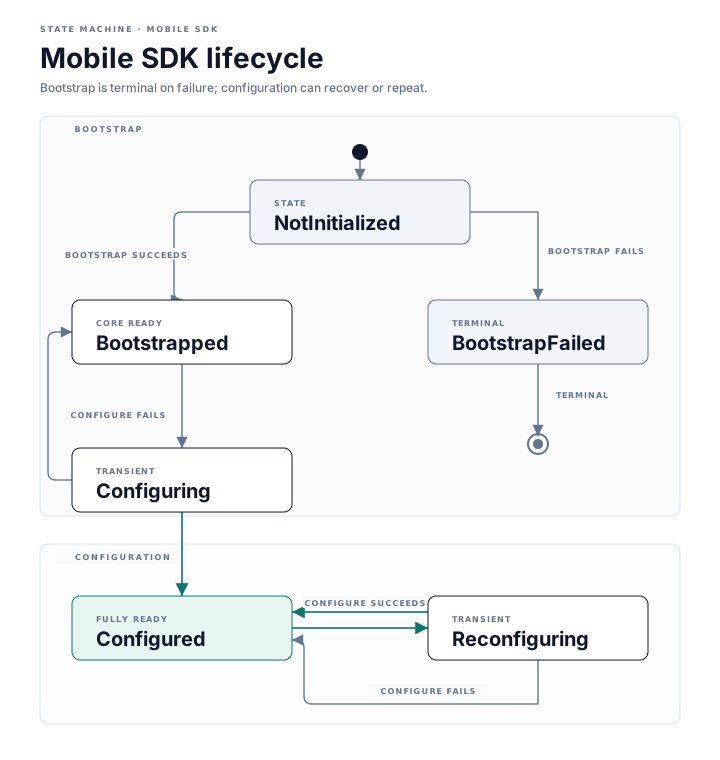
Each state is a public contract, not an implementation detail.
Bootstrap vs Configure: What Belongs in Each Layer
The distinction between bootstrap and configure is not arbitrary. It is the difference between what the SDK needs to start and what it needs to be useful.
Bootstrap takes only what the SDK cannot function without: the application context and any credentials required to identify the client. It should complete synchronously or near-synchronously. It should not make network calls. It should not wait for remote configuration.
Configure takes user context, feature flags, experiment assignments, and anything that requires backend state or authenticated user data. It is asynchronous, can fail, can be retried, and can be called again when user context changes.
kotlin
// bootstrap() - synchronous, minimal, run in Application.onCreate()
SDK.bootstrap(context, apiKey = BuildConfig.SDK_API_KEY)

// configure() - async, can fail, can be recalled on user change
lifecycleScope.launch {
    try {
        SDK.configure {
            userId = auth.currentUser?.id
            analyticsEnabled = preferences.analyticsConsent
        }
    } catch (e: SDKConfigurationException) {
        // configure failure is recoverable
        // SDK remains in Bootstrapped state, core APIs are still available
    }
}
If bootstrap fails, the SDK enters BootstrapFailed. This is terminal. The SDK cannot recover without a process restart. Log the failure with enough detail for the developer to diagnose it, because they will not get another chance in that session.
If configure fails, the SDK returns to Bootstrapped if this was the first configure call, or remains in Configured with the previous configuration if this was a reconfiguration attempt. Configure failure is recoverable. The SDK should continue to work with whatever valid state it last had.
What Is Available in Each State
Not all SDK APIs are equally available in all states. This needs to be documented.
plaintext
State             Core APIs       Context-Dependent APIs
-----------       ---------       ----------------------
NotInitialized    none            none
Bootstrapped      available       fail with SDKNotConfiguredError
Configuring       available       may return stale data or fail gracefully
Reconfiguring     available       available (prior config active until complete)
Configured        available       available
BootstrapFailed   none            none
"Core APIs" means operations that do not require user context or remote configuration: logging an anonymous event, checking the SDK version, or reading cached configuration values.
"Context-dependent APIs" means operations that require the user context or configuration that configure() provides: authenticated operations, user-specific analytics, feature-flag-gated behavior.
When a context-dependent API is called from Bootstrapped, the SDK should not crash silently or block indefinitely. It should fail immediately with a typed error that names the required state:
kotlin
class SDKNotConfiguredError(
    val requiredState: SDKState = SDKState.Configured,
    override val message: String =
        "This API requires SDK.configure() to complete successfully before use."
) : SDKException()
The Configuring State Is Transient
Configuring is an async, transient state. If the host app calls a context-dependent API while Configuring is in progress, the SDK has three reasonable options: queue the call until configuration completes, fail immediately with a typed error explaining that configuration is in progress, or return stale data from the previous Configured state.
The SDK must document which behavior applies. The worst option is to block indefinitely without explanation, which produces a frozen host app that cannot be diagnosed from a stack trace.
Reconfiguration
A common production scenario: the user logs out and a new user logs in. The SDK holds user context from the first session and needs to be reconfigured for the second.
configure() called from Configured should be valid. It transitions the SDK to Reconfiguring, a distinct transient state that makes the reconfiguration attempt visible in the state contract. When the operation succeeds, the SDK moves to a new Configured state. If it fails, the SDK returns to Configured with the previous configuration still active rather than becoming unusable.
kotlin
authViewModel.onUserChanged { newUser ->
    lifecycleScope.launch {
        try {
            SDK.configure {
                userId = newUser.id
                analyticsEnabled = newUser.preferences.analyticsConsent
            }
        } catch (e: SDKConfigurationException) {
            // Reconfiguration failed: SDK returned to prior Configured state
            // Previous configuration is still active, context-dependent APIs still work
        }
    }
}
The SDK's state during reconfiguration should not be opaque. Expose a callback or observable so the host app knows when reconfiguration completes.
Idempotent Initialization
bootstrap() should be idempotent. Calling it from Bootstrapped or Configured should be safe: either a no-op or a clear error that does not destabilize the SDK.
kotlin
SDK.bootstrap(context, apiKey = "key")  // NotInitialized -> Bootstrapped
SDK.bootstrap(context, apiKey = "key")  // already Bootstrapped: no-op, logs a debug warning
Apps with multiple entry points (deep links, push notification handlers, background tasks) may call bootstrap() more than once. An SDK that crashes or corrupts state on a duplicate bootstrap call produces failures that are hard to reproduce and harder to diagnose.
Thread Contract
Every SDK that exposes non-trivial APIs needs a documented thread contract. The contract should answer three questions.
Which APIs are safe to call from any thread? Bootstrap and configure should typically be thread-safe. They use internal synchronization to prevent concurrent initialization. Pure reads (SDK version, current state, cached configuration values) should be thread-safe.
Which APIs are main-thread only? An SDK should not require main-thread calls for initialization or network-bound work. If any API must be called on the main thread, that should be documented and enforced at the API surface.
What thread do callbacks arrive on? This is the first question every host app developer asks after their first integration. If the SDK delivers completion handlers on a background thread and the host app immediately updates UI without dispatching, the result is a crash that appears to have nothing to do with the SDK.
Document callback thread behavior explicitly. Two defensible defaults:
- On Android: commit to one explicit callback thread policy. The clearest approach is to deliver all callbacks on a specific background thread, or to accept a caller-provided
ExecutororCoroutineContextso the host app controls delivery. An SDK that delivers callbacks on whatever thread happened to finish the work creates intermittent main-thread violations that are nearly impossible to reproduce in unit tests. - On iOS: deliver completions on a background queue unless the function is annotated
@MainActor. Do not silently dispatch on main to appear convenient, because this creates implicit coupling to the main queue that callers may not expect.
Android Thread Annotations
Kotlin and Java Android SDKs should use thread annotations from the androidx.annotation package to express the thread contract at the API level:
kotlin
import androidx.annotation.AnyThread

class SDK {
    @AnyThread
    fun bootstrap(context: Context, apiKey: String)

    @AnyThread
    suspend fun configure(block: SDKConfig.() -> Unit)

    // Listener registration is safe from any thread.
    // ConfigurationListener callbacks are delivered on a background thread.
    @AnyThread
    fun onConfigurationComplete(listener: ConfigurationListener)
}
These annotations are enforced by Android Studio's lint rules. If the host app calls an API annotated for a specific thread from the wrong thread, lint flags it. This moves threading errors from runtime crashes to compile-time warnings. Annotating listener registration as @AnyThread and documenting callback delivery thread in the KDoc keeps the contract precise without misleading callers about where the listener fires.
Swift Concurrency and Actor Isolation
In Swift, actor isolation and @MainActor express the thread contract at the type system level rather than as documentation:
swift
// SDK's internal mutable state is actor-isolated: safe under concurrent access
actor SDKCore {
    private var state: SDKState = .notInitialized

    func bootstrap(apiKey: String) throws {
        guard state == .notInitialized else { return }
        // actor-isolated: no data race possible
        state = .bootstrapped
    }

    func configure(block: (inout SDKConfig) -> Void) async throws {
        // suspendable: does not block the calling thread
        state = .configuring
        // ...
    }
}

// Public API that delivers its result on the main actor
extension SDK {
    @MainActor
    func requestPayment(_ request: PaymentRequest) async throws -> PaymentResult {
        // result delivered on main actor: safe to update UI directly
    }
}
When a Swift SDK function is annotated @MainActor, callers know the completion arrives on the main actor and can update UI directly. When it is not annotated, callers know they may need to dispatch. The annotation makes the implicit explicit.
Memory Ownership
An SDK that holds strong references to host-app components causes memory leaks that are difficult to attribute to the SDK.
Android: The SDK should never hold a strong reference to an Activity, Fragment, or View. These are destroyed by the system during configuration changes and back-stack operations. If a reference to the host app's UI layer is needed for callbacks, use a WeakReference or a lifecycle-aware pattern.
CoroutineScope ownership matters equally. An SDK that launches coroutines in GlobalScope or its own long-lived scope will continue running after the host app component that initiated the work is destroyed:
kotlin
// Bad: SDK work outlives the Activity that started it
class SDK {
    private val internalScope = CoroutineScope(Dispatchers.IO)

    fun startOperation() {
        internalScope.launch { /* runs even after Activity is destroyed */ }
    }
}

// Good: caller's scope governs the lifetime of the work
suspend fun processPayment(request: PaymentRequest): PaymentResult {
    // called from lifecycleScope.launch: cancels when the lifecycle ends
}
iOS: Swift closures and delegate patterns create retain cycles when the SDK holds a strong reference to a host-app object that holds a strong reference back to the SDK.
swift
// Bad: retain cycle prevents deallocation
class SDK {
    var delegate: SDKDelegate?   // strong reference
}

// Good: weak reference breaks the cycle
class SDK {
    weak var delegate: SDKDelegate?
}
Completion handlers that capture self also create retain cycles without a weak capture:
swift
// Bad: retain cycle if paymentSDK is held by self
paymentSDK.processPayment(request) { result in
    self.updateUI(with: result)
}

// Good: weak capture breaks the cycle
paymentSDK.processPayment(request) { [weak self] result in
    self?.updateUI(with: result)
}
The SDK documentation should state whether its callback APIs form reference cycles by default and what the caller must do to avoid them.
Android Lifecycle Boundaries
On Android, the SDK must handle process death. Android may terminate the app process when it is in the background. When the process restarts, all in-memory SDK state is gone. The SDK returns to NotInitialized.
Application.onCreate() is the correct entry point for bootstrap(). Activity lifecycle events are not reliable for initialization because Activities are created and destroyed independently of the SDK's lifetime.
kotlin
class MyApplication : Application() {
    override fun onCreate() {
        super.onCreate()
        SDK.bootstrap(this, apiKey = BuildConfig.SDK_API_KEY)
    }
}
Persistent state the SDK needs across process restarts (session tokens, cached configuration) should be stored in SharedPreferences or a database rather than in memory. The SDK should re-bootstrap gracefully and restore cached state rather than starting completely fresh after every process death.
iOS Lifecycle and App Extension Constraints
On iOS, the entry point for SDK initialization is application(_:didFinishLaunchingWithOptions:) or, in Swift-native apps using the @main lifecycle, the body of the App struct. Scene-based lifecycles add a complication: when multiple scenes are active, bootstrap() should be called once per process, not once per scene.
App extensions run in a separate process from the host app. This has consequences that SDK authors frequently overlook.
Memory limits in app extensions are tight and vary by extension type and system conditions. The system may terminate the extension process without warning if the limit is exceeded. An SDK that allocates aggressively during initialization may cause the extension to be killed before it completes its work.
Background URL sessions in app extensions require careful coordination. A session with a .background configuration requires a shared app group container, a stable session identifier that the containing app can match, and the containing app to handle application(_:handleEventsForBackgroundURLSession:). An SDK that creates a background session inside an extension without this coordination produces silent failures or incomplete transfers. For most SDK use cases, foreground sessions are the practical default in extension contexts, with background transfer coordination documented as an explicit opt-in that the host app must configure.
Shared UserDefaults and Keychain access require an app group. If the SDK reads or writes to UserDefaults.standard or the default Keychain access group, that state is not visible from an extension unless both the host app and the extension share an app group, configured in entitlements.
The clearest way to handle app extension contexts: provide an explicit lightweight initialization path, or document which features are not supported in extension contexts. The extension target passes the mode directly rather than relying on runtime detection:
swift
// Extension target: opt into the lightweight path explicitly
SDK.bootstrap(apiKey: "key", mode: .extension)

// Host app target: standard initialization
SDK.bootstrap(apiKey: "key", mode: .application)
If .extension mode disables networking, background work, and features that require full app lifecycle support, the SDK stays within what the extension process can safely do. The mode should default to .application and extension behavior should be opted into explicitly.
An SDK Lifecycle Checklist
Before shipping a new SDK version, use this checklist to validate the lifecycle contract.
- Is
bootstrap()safe to call from any thread? - Is
bootstrap()idempotent? Does a duplicate call fail gracefully without corrupting state? - Does
bootstrap()failure produce a typed error with enough detail to diagnose the cause? - Is the difference between
BootstrappedandConfigureddocumented? - Do context-dependent APIs return typed errors from
Bootstrappedrather than crashing or blocking? - Is
configure()failure recoverable? Does it return to the previous valid state rather than leaving the SDK unusable? - Is
configure()reconfiguration supported from theConfiguredstate? - Are callback delivery threads documented and consistent?
- Do Android APIs carry
@AnyThread,@MainThread, or@WorkerThreadannotations? - Are Swift async methods and
@MainActorannotations applied consistently? - Does the SDK avoid holding strong references to Android
ActivityorFragment? - Do Swift delegate properties and closure callbacks use weak references?
- Has the SDK been tested in an iOS app extension context against the memory and networking constraints?
- Does the SDK behave correctly after Android process death and re-bootstrap?
Article 4 in this series covers the error model that sits on top of this state machine: how to design errors that help developers diagnose problems when the lifecycle contract is violated.
0AI bot reactions
Newsletter
No comments yet.