- What the Examples Use
- The Persistence Context: Your Invisible Middle Layer
- The Four States of an Entity
- Dirty Checking: How Hibernate Detects Changes
- Flushing: When SQL Actually Hits the Database
- persist() vs merge() vs save()
- Open Session in View: The Silent Default
- Putting It All Together
- Key Takeaways
- What Is Next
WritingEngineering
What Actually Happens When You Save an Entity
Most JPA bugs trace back to not knowing what Hibernate does between your code and the database. Understanding the persistence context, entity states, dirty checking, and flush behavior is what turns JPA from a black box into something you can reason about.
17 min readSeries 1 of 4

You call repository.save(entity) ten times a day. But can you answer this without running the code: does it generate an INSERT or an UPDATE? And when exactly does that SQL hit PostgreSQL?
Plenty of experienced developers cannot answer this confidently. They use JPA like a black box. It works, until it does not. Then they spend hours debugging strange behaviors: duplicate inserts, lost updates, unexpected queries.
Following a simple entity through its entire lifecycle makes every Hibernate decision visible. No magic. No hand-waving. Just code, SQL output, and clear explanations.
What the Examples Use
The examples build on a simple Product entity. Every concept includes runnable code and real SQL output from PostgreSQL.
java
@Entity
@Table(name = "products")
public class Product {

    @Id
    @GeneratedValue(strategy = GenerationType.SEQUENCE, generator = "product_seq")
    @SequenceGenerator(name = "product_seq", sequenceName = "product_seq", allocationSize = 1)
    private Long id;

    private String name;
    private BigDecimal price;

    // constructors, getters, setters
}
Why SEQUENCE and not IDENTITY? That choice matters, and the persist vs merge section explains why. For now, PostgreSQL sequences give Hibernate more room to optimize.
The Persistence Context: Your Invisible Middle Layer
When you work with JPA, you never talk to the database directly. There is always something sitting between your code and PostgreSQL. That something is the Persistence Context.
Think of it as a smart map. It holds every entity you have loaded or saved during the current transaction. It tracks changes. It decides when to write to the database. It makes sure that if you load the same row twice, you get the same Java object, not two separate copies.
In Hibernate, the Persistence Context lives inside a Session object. Spring wraps that Session inside an EntityManager. When you use Spring Data JPA repositories, Spring wraps the EntityManager too. The chain looks like this:
Layer stack

Every layer adds convenience, but the Persistence Context is where the real decisions happen.
One Transaction, One Persistence Context
In a typical Spring service transaction, Spring binds one transaction-scoped Persistence Context to that transaction. When the transaction starts, the Persistence Context is empty. As you load and save entities, they get stored in this context. When the transaction commits, the Persistence Context is flushed (all pending changes are written to the database) and then closed.
There is one important Spring Boot caveat: if Open Session in View is enabled for a web request, the Hibernate Session and Persistence Context can stay open beyond the service transaction. That is covered below. For now, focus on the transaction-scoped model, because that is the clean boundary you want in application code.
State machine

This is the single most important concept in JPA. Everything else builds on top of it.
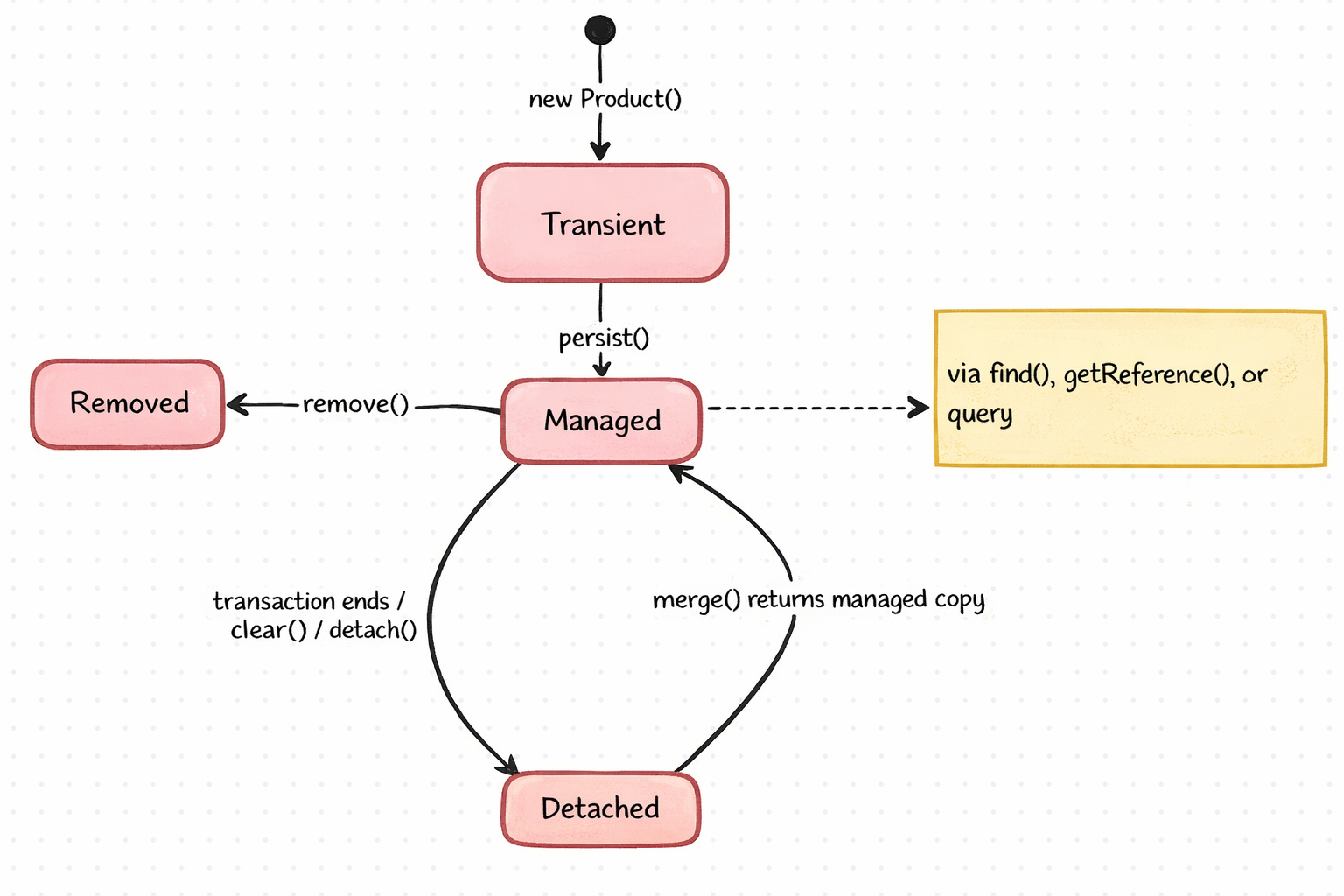
The Four States of an Entity
Every JPA entity exists in one of four states. Understanding these states is the key to understanding why Hibernate generates the SQL it does.
1. Transient: The Database Does Not Know About It
When you create an entity with new, it is transient. Hibernate has no idea it exists. The Persistence Context does not track it. It is just a regular Java object.
java
Product product = new Product();
product.setName("Keyboard");
product.setPrice(new BigDecimal("49.99"));
// This is transient. No SQL. No tracking. Just a Java object.
2. Managed: Hibernate Is Watching
When an entity enters the Persistence Context, it becomes managed. This happens when you:
- Call
entityManager.persist(entity)on a transient entity - Load an entity from the database using
find(),getReference(), or a query - Call
entityManager.merge(entity)on a detached entity (the returned copy is managed)
A managed entity is special. Hibernate takes a snapshot of its field values the moment it enters the context. From that point on, Hibernate watches it. If you change any field, Hibernate will notice the difference at flush time and generate an UPDATE, even if you never explicitly call save again.
java
@Transactional
public void updatePrice(Long productId, BigDecimal newPrice) {
    Product product = entityManager.find(Product.class, productId);
    // product is now managed. Hibernate took a snapshot.

    product.setPrice(newPrice);
    // That is it. No save() call needed.
    // At commit time, Hibernate compares current state vs snapshot.
    // It sees the price changed. It generates an UPDATE.
}
You do not need to call save() or update() on a managed entity. Hibernate detects the change automatically. This feature is called dirty checking, and it is covered in detail below.
3. Detached: Once Managed, Now Disconnected
When the Persistence Context is destroyed (typically when the transaction ends), all managed entities become detached. The entity still has data, including its ID, but Hibernate no longer tracks it.
java
@Transactional
public Product findProduct(Long id) {
    Product product = entityManager.find(Product.class, id);
    return product;
    // After this method returns, the transaction commits,
    // the Persistence Context is destroyed,
    // and 'product' becomes detached.
}
If you modify a detached entity and want those changes saved, you need to bring it back into a Persistence Context using merge().
4. Removed: Marked for Deletion
When you call entityManager.remove(entity) on a managed entity, it becomes removed. Hibernate will generate a DELETE statement at flush time.
java
@Transactional
public void deleteProduct(Long productId) {
    Product product = entityManager.find(Product.class, productId);
    entityManager.remove(product);
    // product is now in 'removed' state.
    // DELETE SQL will be generated at flush time.
}
For normal application code, remove a managed entity. Calling remove() on a detached entity is invalid, and calling it on a transient entity is not useful because there is no database row to delete. That is why you typically load the entity before removing it.
The State Diagram
Dirty Checking: How Hibernate Detects Changes
This is one of the most important mechanisms in Hibernate, and it is invisible. You never call it. You never see it. But it runs every time the Persistence Context flushes.
Here is how it works:
- When an entity becomes managed (loaded or persisted), Hibernate stores a snapshot: a copy of all the entity's field values at that moment.
- At flush time, Hibernate compares the current state of every managed entity against its snapshot.
- For every entity where the values differ, Hibernate generates an UPDATE statement.
java
@Transactional
public void demonstrateDirtyChecking() {
    Product product = productRepository.findById(1L).orElseThrow();
    // Hibernate snapshot: {name="Keyboard", price=49.99}

    product.setName("Mechanical Keyboard");
    // Current state: {name="Mechanical Keyboard", price=49.99}
    // Snapshot:      {name="Keyboard", price=49.99}
    // Difference detected -> UPDATE will be generated at flush

    // No save() call. The transaction commit triggers flush.
    // Hibernate generates:
    // UPDATE products SET name='Mechanical Keyboard', price=49.99 WHERE id=1
}
Notice that the UPDATE includes all columns, not just the changed one. Hibernate updates price too, even though it did not change. This is the default behavior. Hibernate does this because it can reuse prepared statements: the same UPDATE shape works for any combination of changed fields.
If you want Hibernate to update only the changed columns, use @DynamicUpdate on the entity:
java
@Entity
@DynamicUpdate
@Table(name = "products")
public class Product {
    // ...
}
// Now generates: UPDATE products SET name='Mechanical Keyboard' WHERE id=1
Use @DynamicUpdate when your table has many columns and you frequently update only a few. For small entities, the default is fine.
The Cost of Dirty Checking
Dirty checking is not free. At flush time, Hibernate iterates through every managed entity in the Persistence Context and compares every field. If you load 1,000 entities in a single transaction, Hibernate will check all 1,000 at every flush, even if you only modified one.
This is one reason to keep transactions focused and avoid loading large numbers of entities unnecessarily. A later article in this series revisits this in the context of performance.
Flushing: When SQL Actually Hits the Database
If you call persist() on an entity, does the INSERT happen immediately?
No. In most cases, it does not.
Hibernate delays SQL execution as long as possible. The act of actually sending SQL to the database is called flushing. Hibernate flushes at specific points, and the behavior depends on the flush mode.
FlushModeType.AUTO (The Default)
With AUTO, Hibernate flushes:
-
Before the transaction commits. This is the most common trigger. When Spring's
@Transactionalmethod returns normally, the transaction commits, and Hibernate flushes all pending changes first. -
Before a query that might be affected by pending changes. If you persist a new Product and then run a query like
SELECT * FROM products, Hibernate flushes the pending INSERT first to keep query results consistent with pending changes.
java
@Transactional
public void autoFlushDemo() {
    Product product = new Product();
    product.setName("Mouse");
    product.setPrice(new BigDecimal("29.99"));
    entityManager.persist(product);
    // No INSERT yet. The entity is managed but the SQL is pending.

    // This query triggers a flush because it queries the products table
    List<Product> all = entityManager
        .createQuery("SELECT p FROM Product p", Product.class)
        .getResultList();
    // INSERT was executed BEFORE the SELECT, so 'Mouse' appears in results.
}
A note about native queries: With modern Hibernate through the JPA EntityManager API, AUTO mode also flushes before native SQL queries. Since Hibernate cannot reliably parse arbitrary native SQL to determine which tables are involved, the JPA path takes the safe approach and flushes pending changes first.
The Hibernate native Session API has more nuance. A native query created through Session may not auto-flush unless Hibernate knows which entity or query spaces the SQL touches. In regular Spring Data JPA code that goes through EntityManager, the simple rule still holds: expect native queries to flush pending changes first.
FlushModeType.COMMIT
With COMMIT mode, Hibernate only flushes when the transaction commits. It never flushes before queries. This gives better performance (fewer round trips to the database) but you might get stale query results within the same transaction.
java
entityManager.setFlushMode(FlushModeType.COMMIT);In practice, most applications should stay with AUTO. COMMIT mode is useful only in specific batch processing scenarios where you control the query order carefully.
Manual Flush
You can always force a flush:
java
entityManager.flush();This sends all pending SQL to the database immediately, but it does not commit the transaction. The changes are visible to the current database connection but not to other connections (depending on isolation level). If the transaction rolls back after a flush, all those changes are undone.
persist() vs merge() vs save()
entityManager.persist()
- Takes a transient entity and makes it managed
- Does not return anything (void)
- The original object becomes managed: Hibernate tracks it
- An INSERT is scheduled (but not executed immediately unless using IDENTITY strategy)
- If the entity is already managed, the call is a no-op. If you pass a detached entity, Hibernate throws
PersistentObjectException. Note thatpersist()does not check the database: if you manually set an ID that already exists, the error only shows up at flush time as a constraint violation.
java
Product product = new Product();
product.setName("Monitor");
entityManager.persist(product);
// The 'product' object is now managed.
// Hibernate called the sequence to get an ID.
// INSERT is pending, will execute at flush.
With GenerationType.SEQUENCE, calling persist() triggers an immediate call to the PostgreSQL sequence (SELECT nextval('product_seq')) to get the ID. But the INSERT itself is delayed until flush. This is an important optimization: Hibernate can batch multiple inserts together.
With GenerationType.IDENTITY, Hibernate must execute the INSERT immediately because the ID is generated by the database during insertion. This means Hibernate cannot batch IDENTITY inserts, which is one reason SEQUENCE is preferred for PostgreSQL.
entityManager.merge()
- Takes a detached or transient entity
- Returns a new managed copy: the original object stays detached (or transient)
- If the entity is transient (no ID),
merge()behaves likepersist(), but the original object is still not managed - If the entity has an ID, Hibernate checks if it is already in the Persistence Context. If not, it loads it from the database (SELECT). Then it copies the field values from your detached entity onto the managed copy.
java
Product detached = // some entity from outside this transaction
Product managed = entityManager.merge(detached);

// 'detached' is still detached - changes to it are NOT tracked
// 'managed' is the one Hibernate watches
// Common mistake: continuing to use 'detached' after merge
This is a common source of bugs. Developers call merge() and then continue modifying the original object, expecting those changes to be persisted. They are not. You must use the returned object.
repository.save(): Spring Data's Wrapper
Spring Data JPA's save() method is a convenience wrapper. Here is what it actually does (simplified):
java
public <S extends T> S save(S entity) {
    if (entityInformation.isNew(entity)) {
        entityManager.persist(entity);
        return entity;
    } else {
        return entityManager.merge(entity);
    }
}
It checks if the entity is "new" using Spring Data's entity state detection. By default, Spring Data JPA first checks a non-primitive @Version property if one exists. If that version is null, the entity is considered new. If there is no version property, it falls back to the identifier:
- If the
@Idfield isnull, the entity is new andpersist()is called - If the
@Idfield has a value, the entity is treated as not new andmerge()is called
This is why the ID generation strategy matters:
java
// SEQUENCE strategy
Product product = new Product(); // id is null
productRepository.save(product);
// isNew() returns true -> persist() is called
// Result: SELECT nextval('product_seq') + INSERT (at flush)

// But what if you manually set the ID?
Product product = new Product();
product.setId(999L); // id is NOT null
productRepository.save(product);
// isNew() returns false -> merge() is called
// Result: SELECT (to load existing) + INSERT (if not found)
// This is wasteful. Hibernate does an unnecessary SELECT.
This is a real problem when you use assigned IDs (like UUIDs that you generate in code). Spring thinks the entity already exists and calls merge(), which triggers an unnecessary SELECT. The solution is to implement Persistable<T>:
java
@Entity
public class Product implements Persistable<UUID> {

    @Id
    private UUID id;

    @Transient
    private boolean isNew = true;

    @Override
    public UUID getId() {
        return id;
    }

    @Override
    public boolean isNew() {
        return isNew;
    }

    @PostLoad
    @PostPersist
    void markNotNew() {
        this.isNew = false;
    }
}
For most cases, use GenerationType.SEQUENCE and let Hibernate handle the IDs. It avoids this problem entirely.
Open Session in View: The Silent Default
Spring Boot enables Open Session in View by default. This means the Hibernate Session (and the Persistence Context) stays open for the entire HTTP request, not just during the @Transactional service method, but also during view rendering or JSON serialization in the controller.
Process

Why does Spring do this? Because without it, any lazy-loaded relationship accessed outside a transaction throws a LazyInitializationException. OSIV keeps the Session alive so lazy loading works everywhere.
Why OSIV Is a Problem
It sounds convenient, but OSIV causes real problems in production:
-
Lazy loading fires outside your transaction, grabbing database connections on demand. After the
@Transactionalmethod returns and the transaction commits, the JDBC connection is released back to the pool. But the Hibernate Session is still open. If lazy loading triggers during JSON serialization, Hibernate needs to acquire a connection from the pool again. Under load, these on-demand connections outside your transaction boundary can put pressure on your connection pool. -
It hides bad code. When lazy loading works everywhere, developers never learn to think about fetch strategies. They load an entity in the service, return it to the controller, and access lazy collections during serialization. This works, but it generates SQL queries outside your transaction boundary, queries you cannot see in your service layer.
-
N+1 queries become invisible. Because lazy loading silently fires in the controller, N+1 problems happen where you do not expect them, and they are much harder to detect.
Turn It Off
Add this to your application.yml:
yaml
spring:
  jpa:
    open-in-view: false
When you turn off OSIV, you will get LazyInitializationException if you access unloaded lazy relationships outside a transaction. That is a good thing. It forces you to load everything you need inside the service layer, where you have control.
Spring Boot logs a warning at startup if OSIV is enabled:
plaintext
WARN: spring.jpa.open-in-view is enabled by default.
Therefore, database queries may be performed during view rendering.
Explicitly configure spring.jpa.open-in-view to disable this warning.
Most developers ignore this warning. Do not.
Putting It All Together
Consider a realistic scenario traced step by step. A service creates a product, queries for products, and updates a price, all in one transaction.
java
@Service
public class ProductService {

    @Autowired
    private EntityManager entityManager;

    @Transactional
    public void completeDemo() {
        // Step 1: persist a new product
        Product keyboard = new Product();
        keyboard.setName("Keyboard");
        keyboard.setPrice(new BigDecimal("49.99"));
        entityManager.persist(keyboard);
        // SQL: SELECT nextval('product_seq')  <- ID generated immediately
        // No INSERT yet. Entity is managed with id=1.

        // Step 2: query all products
        List<Product> products = entityManager
            .createQuery("SELECT p FROM Product p", Product.class)
            .getResultList();
        // SQL: INSERT INTO products (id, name, price) VALUES (1, 'Keyboard', 49.99)
        //      ^ Auto-flush: Hibernate flushes before the query.
        // SQL: SELECT p.id, p.name, p.price FROM products p

        // Step 3: modify the product - no save needed
        keyboard.setPrice(new BigDecimal("59.99"));
        // No SQL yet. Dirty checking will catch this at commit.

        // Step 4: method returns, transaction commits
        // SQL: UPDATE products SET name='Keyboard', price=59.99 WHERE id=1
        //      ^ Dirty checking detected the price change.
    }
}
Total SQL executed:
SELECT nextval('product_seq')atpersist()timeINSERT INTO products ...auto-flush before the querySELECT ... FROM productsthe JPQL queryUPDATE products ...flush at commit
Four SQL statements. If you did not understand the Persistence Context, you might have expected a different order, or missed the UPDATE entirely because there is no save() call.
Key Takeaways
-
The Persistence Context is a smart cache that sits between your code and the database. It tracks entity states, detects changes, and decides when to write SQL.
-
Entities have four states: transient (new, unknown to Hibernate), managed (tracked, changes auto-detected), detached (previously managed, no longer tracked), removed (scheduled for deletion).
-
Dirty checking means you do not need to call
save()on managed entities. Hibernate compares current state against a snapshot at flush time and generates UPDATEs automatically. -
Flushing is not committing. SQL is sent to the database at flush time, but it is only permanent when the transaction commits. AUTO flush mode sends SQL before queries and at commit time.
-
persist()is for new entities,merge()is for detached entities.save()decides which one to call based on the entity's ID. When in doubt, usepersist()for new entities: it is simpler and avoids the unnecessary SELECT thatmerge()can cause. -
Turn off OSIV (
spring.jpa.open-in-view: false). It hides problems and wastes database connections. Load everything you need inside your service layer.
What Is Next
With the persistence context and entity lifecycle in place, the next article in the series covers @Transactional: how Spring creates transaction proxies, what propagation levels actually mean, and the silent bugs that happen when @Transactional does not work the way you think it does.
The complete source code for the examples in this series is available on GitHub.
0AI bot reactions
Newsletter
No comments yet.